AmiVoice on kintone - Flying Nimbus and Smooth Wind Ears -

Hello, this is Spice Dog.
"Summer vacation is nearing its end, and billowing clouds like the Nimbus are forming in the sky—looks like we're in for some rain."
✖ Kinton (Flying Nimbus)
〇 Cumulonimbus cloud
"Kinto-un" is a fictional cloud that appears in the Chinese novel "Journey to the West" and the manga "Dragon Ball," which enables those who ride it to fly through the sky. "Junpuji" is a deity paired with Senrigan, possessing supernatural powers to hear distant sounds and voices.
Today, we introduce applications for "audio data transcription," "word registration management," and "monthly fee display" that utilize the AmiVoice API from kintone, Japan's first no-code/low-code tool.
Furthermore, the apps and plugins introduced in this article are available as engineering samples in the repository. If you want to try them out right away, please download and use them.
Public repository: https://github.com/advanced-media-inc/amivoice-api-kintone-samples
return;
#Adios!
Let's continue.
1. kintone configuration: apps and plugins
kintone is a business application development, execution, and operation platform built by combining "apps" that manage business data and "plugins" that extend their functionality.
The app is a business application equipped with functions such as input forms, databases, list displays, search, and aggregation, and is primarily created using drag-and-drop operations. Furthermore, if more advanced screen displays or functions are required, these can be supplemented with "app customization" using JavaScript and CSS.
Plugins are extension components that add functionality to kintone apps. For example, they allow you to do things that are difficult to do with standard features alone, such as integrating with external services like the AmiVoice API or implementing custom business rules.
Plugins are typically developed using JavaScript, but this time we implemented it using a generative AI. I'll briefly explain how we did that as well.
This is a list of plugins and app customizations (customization JavaScript) used in this sample application.
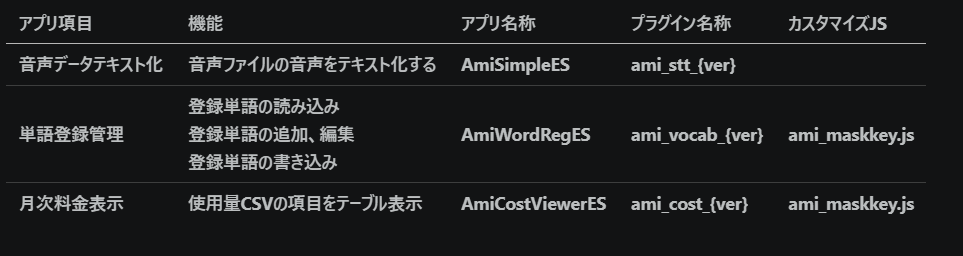
List of kintone apps and plugins
Integration with the AmiVoice API will be implemented using a plugin. The data acquired by the plugin will be used in the kintone application, and the display method and integration into the workflow can be flexibly customized according to requirements. The AmiVoice API specifications will conform to the public manual. The manual to refer to is as follows:
The speech-to-text app uses a Synchronous HTTP interface for speech recognition.
Synchronized HTTP Interface | AmiVoice API Manual | AmiVoice Cloud Platform
The word registration management app calls an API to register and edit new words.
User Dictionary Registration API | AmiVoice API Manual | AmiVoice Cloud Platform
The monthly billing display app uses the usage CSV acquisition API. However, the interface specifications are not included in the manual, so please contact us if you require further details.
Check Usage and Charges | AmiVoice API Manual | AmiVoice Cloud Platform
2 Development
If traditional development is "designing classes and methods and writing code," then creating apps with kintone is closer to "designing and configuring the relationship between business processes and data." The importance of requirements definition remains the same, but much of the time previously spent on class design and coding can now be redirected to business process design and operational design.
2.1 Plugins
We utilized a generative AI for plugin development. First, we organized the requirements in a requirements specification document, and then generated JavaScript code based on that document. In addition to the functional requirements we wanted to achieve, the requirements specification document also included the application's functional specifications and the specifications and reference materials of the APIs it would integrate with, so that the generative AI could refer to the information necessary for implementation.
While using generative AI significantly lowers development hurdles, the quality of the deliverables largely depends on the quality of the requirements specification. Ambiguous requirements can lead to increased revisions, code complexity, and reduced maintainability. Therefore, it is important to describe the desired functions and behaviors specifically, even if concisely.
For reference, I've attached the requirements specification (vocabulary-management-app_requirements.md) that I used when creating the "Word Registration Management Plugin". However, it wasn't completed in one go; I made several revisions before releasing version 1.0.0.
Requirements definition for the AmiVoice user dictionary registration function: requirements/vocabulary-management-app_requirements.md

Overview: A GUI application that allows batch registration of a word list displayed in a table format using the dictionary registration API. It can create new word list tables, and read, edit, and add words that have already been registered. Word registration is possible for each engine and can be separated by profile ID.

1. User input to display the word list
    1) API key: Used for reading and overwriting registered words
    2) List of target engine names (engine name (for display) and connected engine name (API parameter))

Engine name Connected engine name
Japanese E2E_General-purpose -a2-ja-general
Chinese E2E_General-purpose -a2-zh-general
Multilingual E2E_General-purpose -a2-multi-general
Japanese E2E_General-purpose batch -a2b-ja-general
Chinese E2E_General-purpose batch -a2b-zh-general
Multilingual E2E_General-purpose batch -a2b-multi-general
Conversation_General-purpose -a-general
Conversation_Medical -a-medical
Conversation_Finance -a-bizfinance
Conversation_Insurance -a-bizinsurance
English_General-purpose -a-general-en

    3) Enter Profile ID (Select an existing profile ID or enter a new one freely (composed of half-width alphanumeric characters, hyphens, and underscores))

    4) Registered Word Set Spelling, Reading, Class Class Options =
    "classnames": [
    "固有名詞",
    "名前",
    "名前(名)",
    "駅名",
    "地名",
    "会社名",
    "部署名",
    "役職名",
    "記号",
    "括弧開き",
    "括弧閉じ",
    "元号"]

    5) Action Buttons Read profile ID button, Read registered word button, Register button

2. GUI Specifications
    Table Items:
    Title row: Spelling, Reading, Class Registered word row: Spelling input box, Reading input box, Class input box (Dropdown list of class options)

3. Word Registration API Interface Specifications See the manual below:
https://docs.amivoice.com/en/amivoice-api/manual/user-dictionary-api
https://docs.amivoice.com/en/amivoice-api/reference/profilewords/get-profile-words
https://docs.amivoice.com/en/amivoice-api/reference/profilewords/get-profiles
https://docs.amivoice.com/en/amivoice-api/reference/profilewords/set-profile-words

4. Use Cases
    1) Registering words as a list in a new profileID
        Enter your API key Enter your desired profileID
        Enter the spelling and pronunciation of the words you want to register in the table and select a class
        Press the register button

    2) Editing and adding words registered in an existing profileID
         Enter your API key Press the read profileID button
         Select your profileID Read the registered words into the table
         Enter the spelling and pronunciation of the words in the table and edit a class
         Press the register button
Requirements specification for the "Word Registration Management App"
The three plugins we created can be downloaded from the Assets section of our GitHub release page.
Please refer to the following release page for the latest version.
Release page: GitHub Releases · advanced-media-inc/amivoice-api-kintone-samples/releases/latest
2.2 Apps
The app will be created using kintone's excellent form functionality. Below is an example of a form for the "音声テキスト化アプリ (Speech-to-Text App)," which has a simple structure for uploading audio files and selecting a recognition engine.
When designing forms, you can feed the requirements specification into the generative AI, which will then suggest necessary fields and screen layout options. Therefore, even those with little experience in form design can efficiently build applications based on the requirements specification.
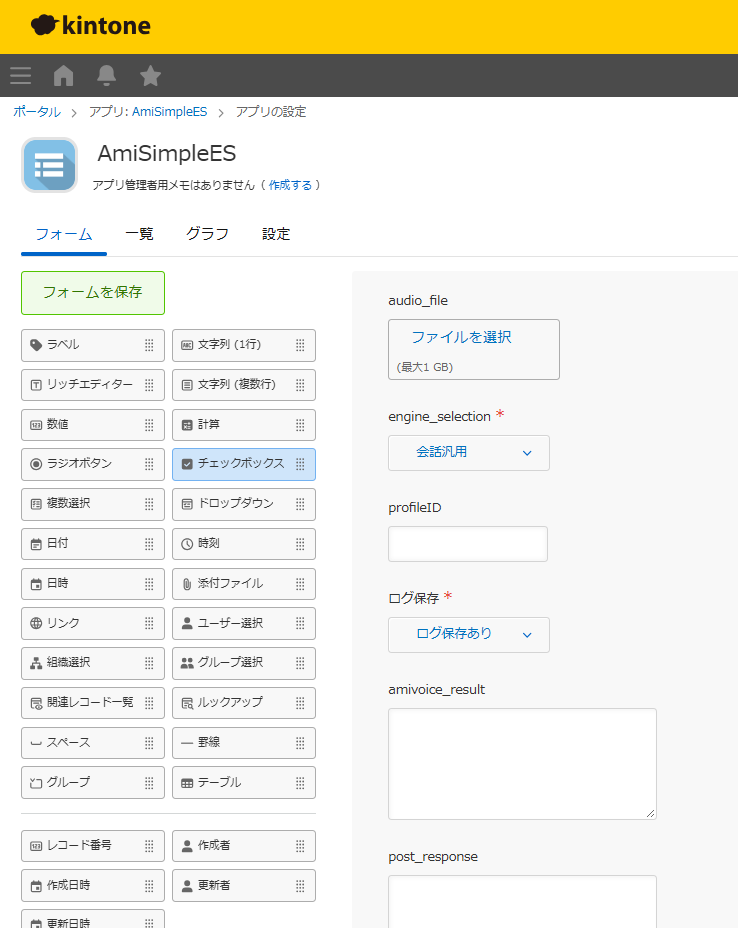
Form design for a speech-to-text app
I've uploaded the app template to the GitHub release page, so please feel free to use it.
Speech-to-text conversion app – templates
Word registration management app – template
Monthly billing display app – template
Furthermore, here is the customized JavaScript to mask the API key for secure use of the word registration management app and the monthly fee display app.
ami_maskkey.js – Customizable JS
3. Execution
Now, let's run the app with all the components applied.
First, load the three types of plugins from the kintone system administration screen.
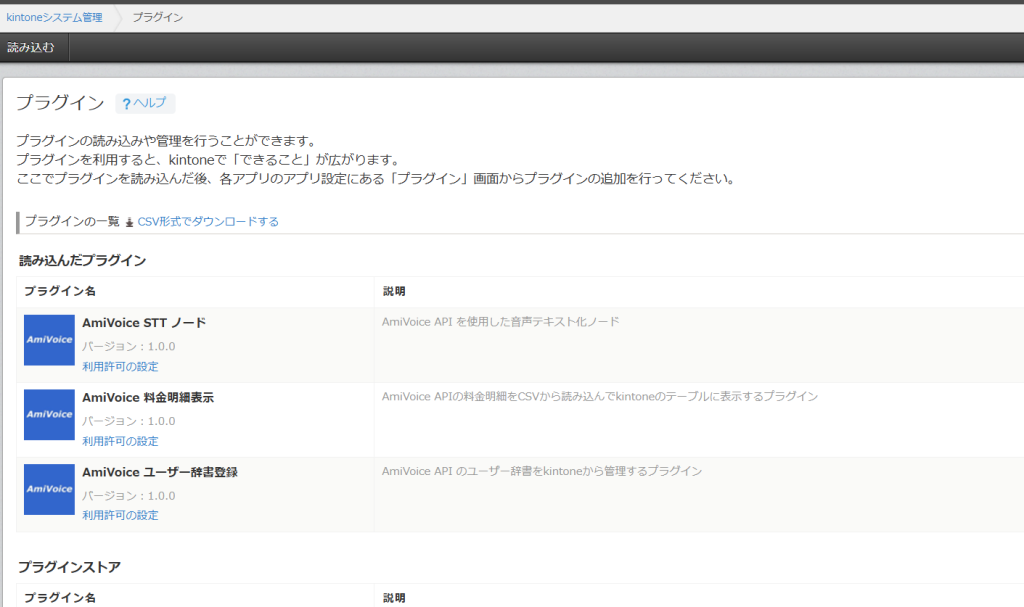
Plugin loaded
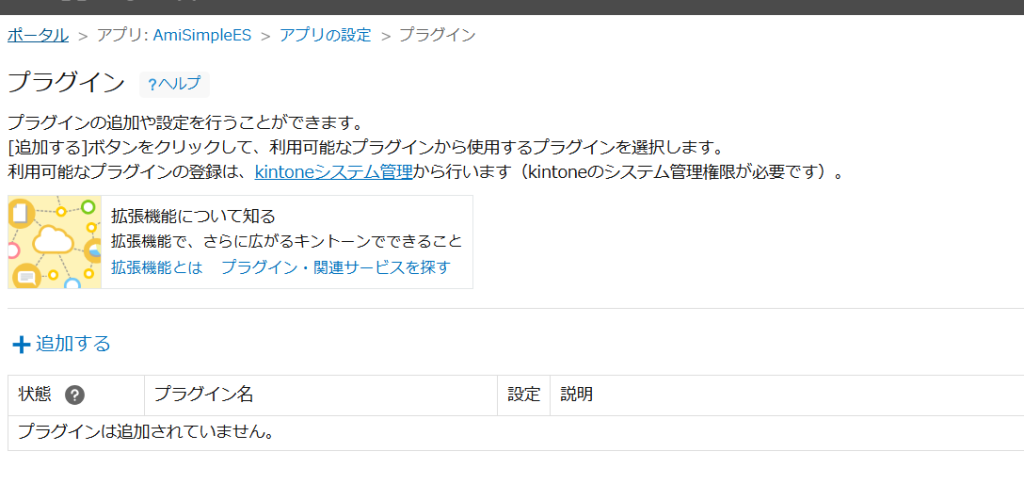
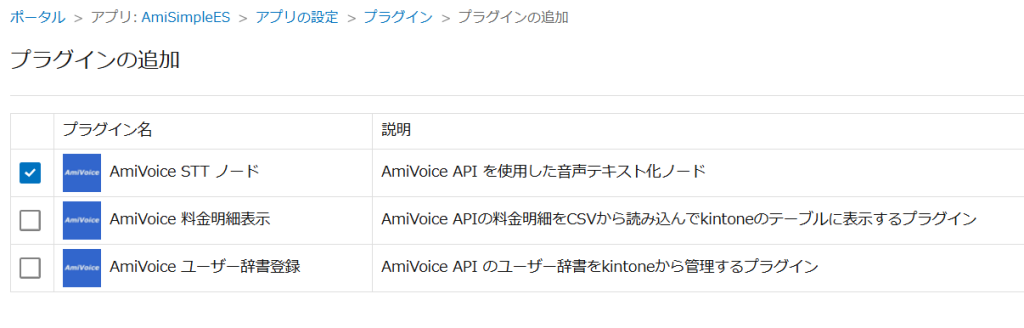
Next, open the settings screen for each app and add the plugin you want to use. This process is common to all apps that use plugins.
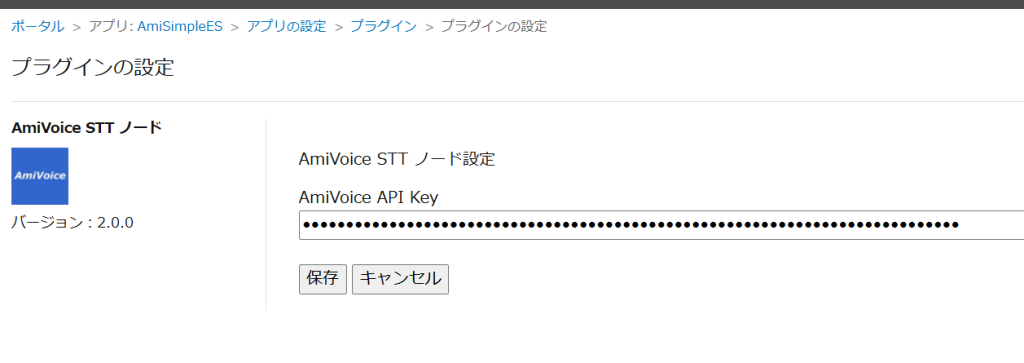
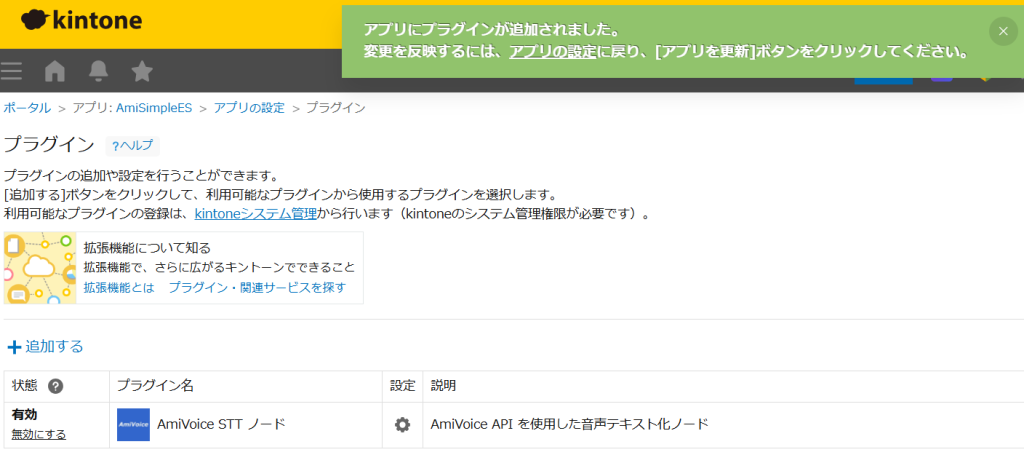
This time, we'll add the "AmiVoice STTノード (AmiVoice STT node)" plugin to the speech-to-text application.
After adding the plugin, open the settings screen from the gear icon and register your own API key. The registered API key is stored in kintone's proxy settings, and kintone adds it as an Authorization header when sending to the AmiVoice API. Application users cannot read the API key from the browser.
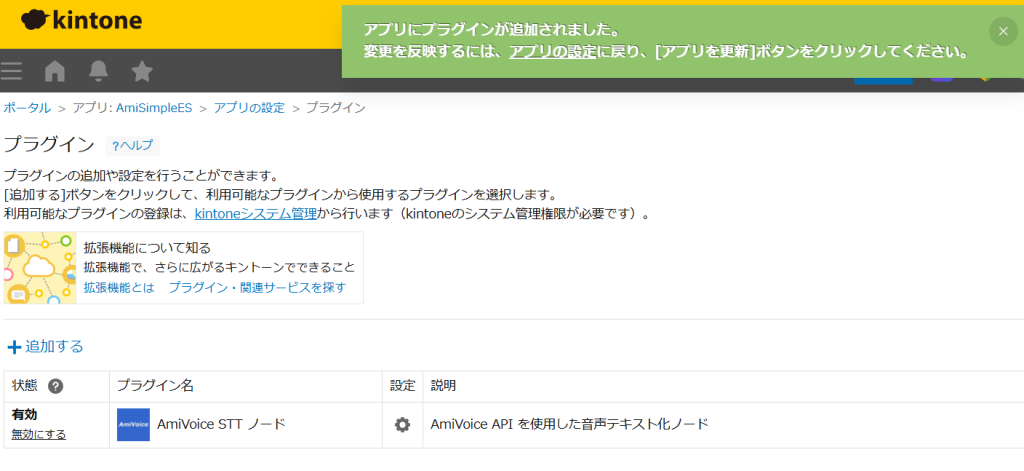
After the setup is complete, you will be prompted to update the app, so please follow the on-screen instructions to perform the update.
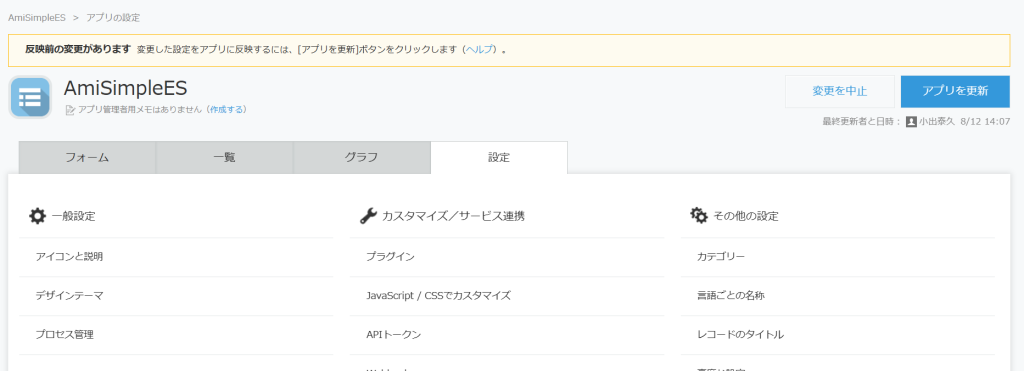
That completes the setup. Return to the app screen and click the [+] button to open the input form.

Select the audio file, the speech recognition engine to use, and whether or not to save logs ("ログ保存あり (Logging)" / "ログ保存なし (No Logging)"), then click [保存 (Save)]. If you are using words registered in the word registration management app, enter the profile ID in "profileID". Once the process is complete, the speech recognition result will be output to the "amivoice_result" field.
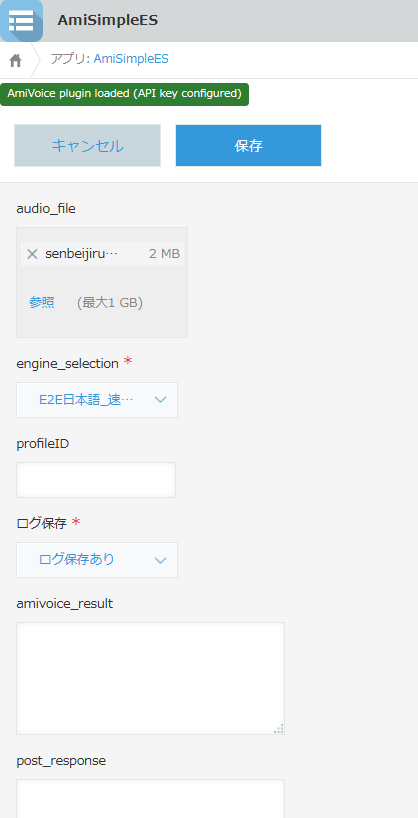
Audio file and speech recognition engine selection
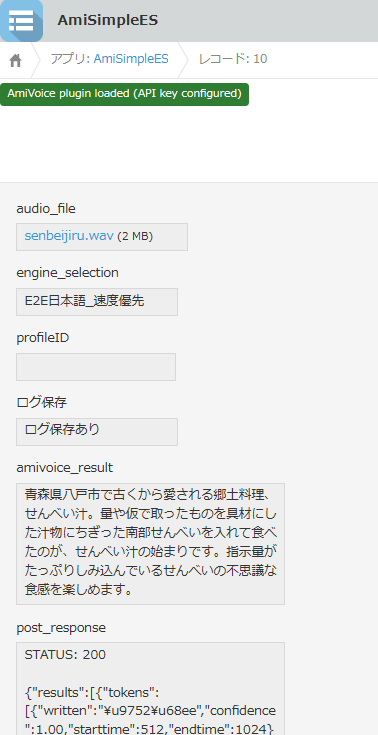
Speech-to-text conversion results
For instructions on how to use each application, please refer to the guide in the repository. This document only includes screenshots of the applications.
Speech-to-Text Conversion App Startup Guide
Word Registration Management App Startup Guide
Monthly billing display app - Startup guide
This sample is provided as a reference implementation. For actual use, please evaluate and apply it at your own risk. The form configuration and screen layout are merely samples; we encourage you to freely modify and expand them according to your business needs to customize the application for greater ease of use.
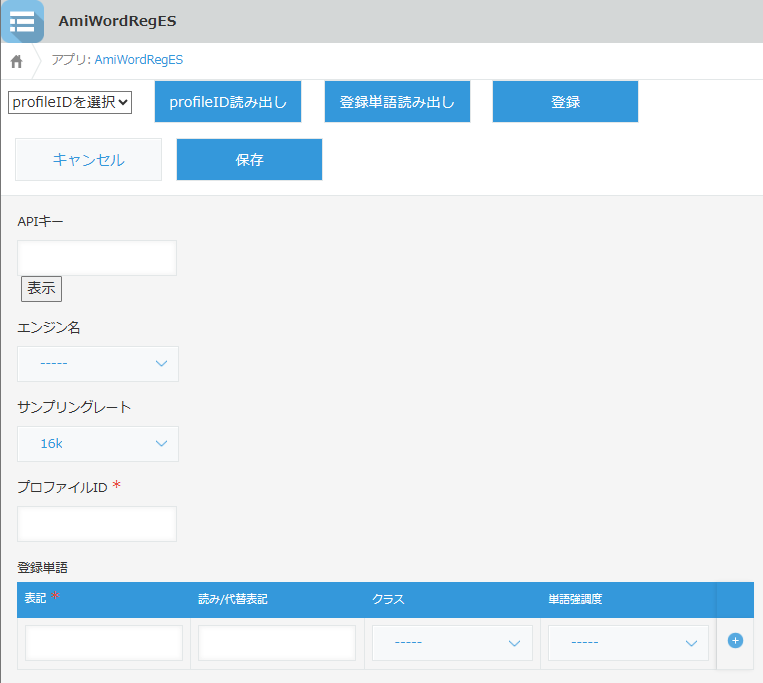
Input screen of a word registration management app
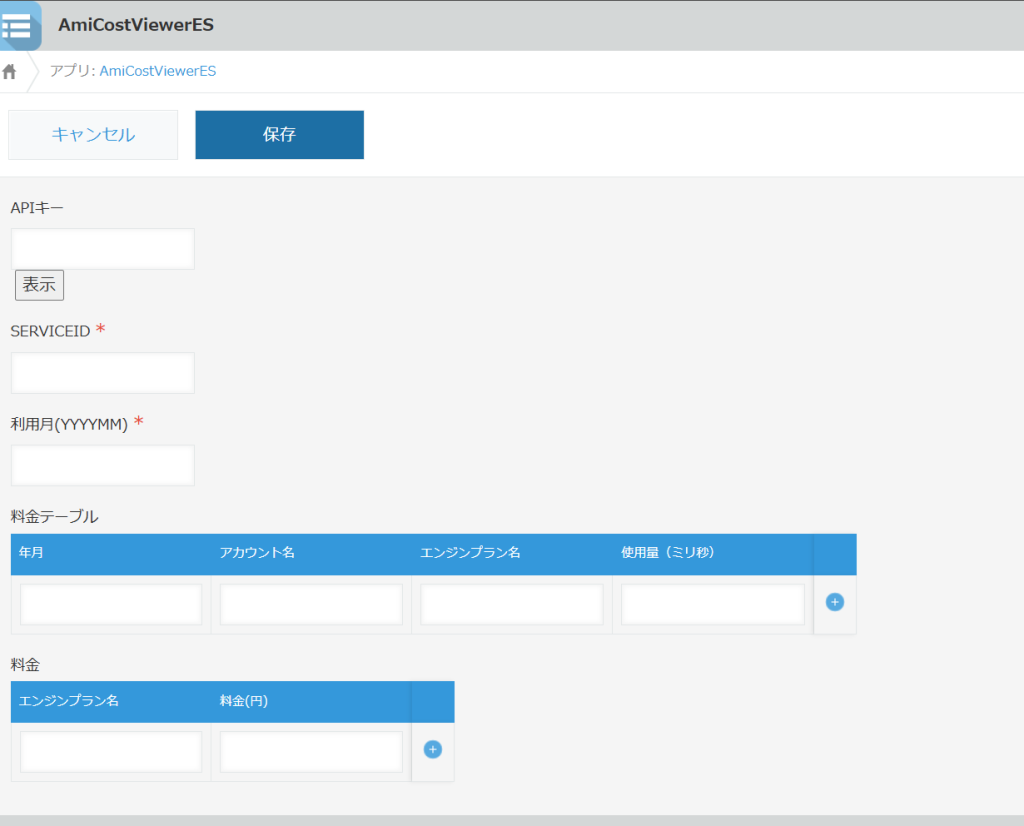
Input screen for the monthly billing app
The app customization JavaScript file ami_maskkey.js, which is common to both apps, is applied from the app settings of each app.
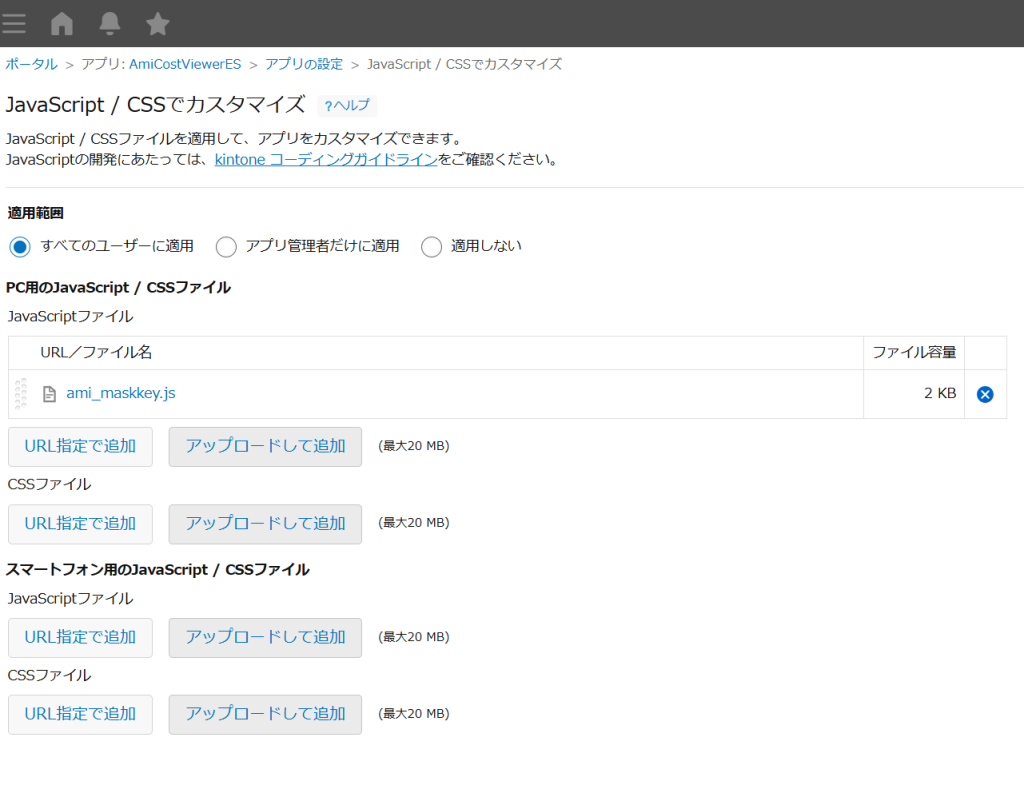
How to apply JavaScript for app customization
4. Conclusion
In this way, kintone is a platform that allows you to build flexible business systems even with little programming knowledge by combining plugins with applications. Plugins can be reused across multiple applications, and by utilizing generative AI, implementation can proceed efficiently based on requirements specifications and public manuals. Users can focus on organizing business challenges and planning and designing applications, while relatively easily integrating speech recognition functionality using the AmiVoice API into their business applications. We encourage you to use it to improve and streamline your department's operations.
Going forward, we will continue to provide information tailored to your business needs, based on our speech recognition technology.
Thank you for reading it until the end.
Person who wrote this article
Spice Dog
A brown-colored engineer with a deep love for Shiba Inu dogs and Indian curry, he decided to take a fresh start and dive into the world of speech recognition, driven by a desire to add some spice to his daily life.
Recently, I noticed that my dog can distinguish the engine sounds of Subaru cars, and I've been secretly daydreaming about whether a dog's hearing ability could be used in speech recognition technology.
Most Viewed Articles
-
A quick explanation of how speech recognition works!

-
Comparing the speech recognition rates of OpenAI's Whisper and AmiVoice for "conference" audio
-
How to use the AmiVoice API free coupon

New Articles
-
A 70-year history of speech recognition: How has the technology evolved?

-
AmiVoice on kintone - Flying Nimbus and Smooth Wind Ears -

-
Organizing the AmiVoice API manual for AI generation - Providing Markdown and llms.txt files -
Category List
- Introduction to Speech Recognition (18)
- How to Improve Speech Recognition Accuracy (14)
- Tried Building It (28)
- How to Use AmiVoice API (32)
- Comparison and Verification (9)
- Others (11)
Archive